Mentor Toolchain Status Update

I’ve been having problems with layout. I will detail them at the bottom. For now, I’ll show the results of what works first and describe the problems.

Transistor Level Design & Simulation

NOR2 transient response

These are the ELDO results for a NOR2 gate constructed using the DK transistors via schematic capture. So, we can construct our own custom gates and simulate them. However, I was unable to get SDL working for this design. Note: It took a while to get this working as ICNET was not getting the W/L information from the INSTPAR property. We need to specify a W and L property for each transistor to get the simulation models to work. We can use the default MN and MP symbols from Mentor as long as we set the appropriate ASIM_MODEL, W and L properties.

The DK provides TYP, SLOW, FAST transistor models. These files (in $MTC_CMOS05/analog/) need to be included in the final SPICE netlist. This can be specified from the simulation menus. The models used here are the EN and EP models. There is also a ENMM9 and EPMM9 model (Philips MM9) in the library that we can use. The SGS-Thompson models in the library cannot be used as we do not have the license for it.
Analogue Design & Simulation

NOR2_RING analogue simulation

As you can see, ELDO simulation of a NOR2_RING works. The design is made up of instances of the NOR2 above, laid out in a RING via schematic capture. So, it is possible to capture a hierarchical design in a schematic, and simulate it. This is only useful for designs constructed from scratch. The DK does not provide schematic level simulation data for the standard cells. It only provides compiled digital models. So, it is only possible to do complex gate-level simulation digitally. This should be okay as long as we limit the analogue simulation to our custom NOR2 gate.

Digital Design & Simulation
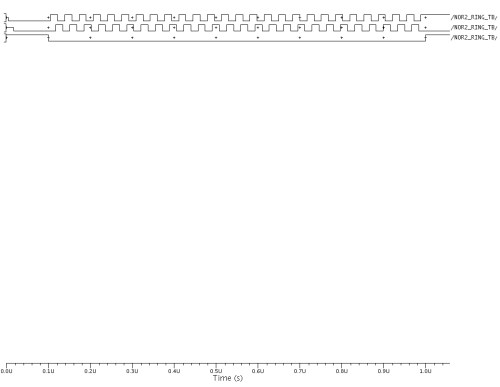
NOR2_RING digital simulation

As you can see, the digital simulation works as well. This is a MODELSIM simulation of the RING oscillator that was designed via schematic capture. However, instead of simulating the transistor models, the NOR2 gate above is described using a VHDL model. It was important to test this as there are VHDL simulation models for all the DK standard cells. Even if we do not get Leonardo working, it would still be possible to construct a design using the standard cells by performing synthesis by hand of simple designs.

It should be possible to enter the design as a schematic (as is done in the present VLSI project) and construct basic building blocks (counters, shift registers and other blocks). Then, it should hopefully be possible to instantiate the DK simulation models. I have tried simulating the DK models and they work. However, I have yet to try instantiating the DK models from within a schematic capture for digital simulation.

I have also yet to try building a design and simulating it from a purely VHDL netlist. This should work as we are allowed to IMPORT a VHDL netlist from within ICSTUDIO. I will need to try this next.

What DOES NOT Work

At the moment, the biggest head-ache is layout. It is possible to directly run SDL for the standard cells by modifying the existing DK. I am still unable to get the internal device generator to work, in order to layout transistors directly. This may have something to do with another missing property for the transistors, or it may be something else. I’ll try to get this to work. If this can work, we can at least bring the design of a single NOR2 gate from start to finish.

Although I am able to run SDL for the standard cells, I am unable to get FLOORPLANNING nor AUTOCELLS to work. So, the standard cells are laid out according to their positions in the schematic. This means that there will be a lot of manual cajoling required. I do not know why these things do not work. Hopefully, I’ll figure it out soon.

What We CAN do

  1. Design the whole design using standard cells in a schematic or possibly, a low-level VHDL netlist. We can simulate it at the gate-level with digital simulation and layout the design using the standard cells via SDL.
  2. Design a custom NOR2 using standard transistors. This will fall short of the full design flow as we cannot yet do the transistor level SDL layout.

What is UNKNOWN

For some reason, Calibre has popped up in the menus. As I am yet unable to do a transistor level layout, I have yet to test the DRC, XRC processes. I have also not been able to test BACK-ANNOTATION nor digital simulation with SDL (delay) data. I will try to get layout working and ascertain if Calibre works.

Mentor Toolchain Status

We have started making some progress with the installation and setup of the Mentor software. Due to the difference in the versions for the AMI05 design kit and the latest Mentor version, the instructions for using the DK are essentially non-applicable. So, I am trying to figure out how to work the DK from within the latest Mentor setup.

Library Integration
The MGC_DESIGN_KIT can be manually specified from within ICSTUDIO. This means that the old mgc_location_map file is not really relevant anymore. The /parts folder contains circuit symbols ONLY.

Schematic Entry
Schematic capture within DA_IC works as before. When the correct AMI05 library is added, all the standard cells can be inserted into the schematic. I tested it by building a RINGOSC schematic using 17 NAND gates.

Schematic Driven Layout
SDL works only if the layout cells are specified correctly. At the moment, I cannot figure out how to specify this directly. Therefore, the work-around that I’m using is copying all the layouts for each standard cell into the /parts folder. So, it now contains symbols AND layouts. If I can figure out how to tell ICSTATION to look for the layouts in a different folder, we can leave the DK as it is.

Auto Place & Route
APR doesn’t work as the userware script calls a programme (lconvt) that doesn’t seem to exist. So, the next best thing to do is to use SDL and that works. It produces similar results, as can be seen in the figure. I will not encourage using it for large designs though. Therefore, the final design that we use may need to be partitioned properly.

Layout Checking
The generated layout FAILS LVS. I will need to investigate why the nand instance names changed from ND2 to X_ND2, which is the reason why LVS fails. I cannot seem to invoke Calibre for DRC/PEX checking from anywhere. I’m guessing that there must be some missing environment variable somewhere.

VHDL/Verilog Design Entry
I’m able to edit Verilog files directly from ICStudio. It also invokes Modelsim to check the code for errors. I’m only going to test it with Verilog but I assume that VHDL works the same way.  I will need to get Leonardo Spectrum installed before I can test SYNTHESIS. It has still not been installed at the moment because SJM has discovered that it doesn’t run on Linux. We will try to run it on Windows instead. I can see menus in ICSTUDIO that allow Verilog netlists to be directly imported. I’m assuming that it will be able to generate a schematic from the Verilog netlist, in order for backend work to be done.

VHDL/Verilog Simulation
I can simulate RTL code directly within ModelSim. It seems that DA_IC is also capable of invoking modelsim internally and viewing the output data in EZwave. This will be preferable for simulating post synthesis designs. I will have to investigate how to set this up correctly. At the moment, it doesn’t quite work as it is unable to find the references used.

There is a /quickhdl directory that seems to contain the necessary simulation data for the standard cells. However, I have yet to figure out how to tell Modelsim to use this. There should be some command line parameter or something that I can pass it to get it to work.

Mentor Software Problems

I’d just gotten back from Malaysia and moved into my new room yesterday. I contacted SJM today and he told me that he’s having problems setting up the Mentor software. However, he thinks that he’ll be able to make some progress soon. I’m not sure what the details of the problems are, but hopefully, they’ll be sorted out soon. He says that the same problems exist for different versions of Mentor software.

I’ve  just tried running the software and they’re all complaining of missing various libraries. In certain cases, it seems that the RedHat server has got newer libraries and the Mentor software is looking for older ones. In other cases, it seems that the RedHat server cannot find the libraries even though it’s already located on the system.

I’ve asked SJM to grant me root access to the system so that I can try to help fix the problems. Hopefully, he’ll grant me the access.

RedHat Server and ASIC Design Kit

I’ve just spoken to SJM, this afternoon, about the status of the RedHat Servers. It is something that they’re doing very soon and he told me that they should have it all set up in the next couple of days. Hopefully, I’ll be able to start looking at the design kit compatibilities asap.

He mentioned that he might want to try running it on the SuSE system to see if it works on it. If it does (there isn’t a real reason why it should not), then we may just run them off SuSE instead.

I’ve discovered something interesting called the ASIC Design Kit (ADK), which is a generic design kit provided by mentor under their Higher Education Programme. However, I’m not sure if we have access to the ADK as it is not listed directly on either the EUROPRACTICE site nor the RAL site.

From the ADK documentation, the target technologies are AMI 0.5m and 1.2m and TSMC 0.35m, 0.25m and 0.18m. This is good as we have direct access to the AMIS 0.5um backend design kit and we only need one foundry process for teaching purposes. From the ADK documentation, the kit provides:

  • Support for schematic, HDL or mixed schematic/HDL based designs
  • Synthesis support for Leonardo Spectrum
  • Pre-layout timing simulations with QuickSim and ModelSim (VHDL or Verilog)
  • Scan insertion support for DFTAdvisor
  • Automatic test pattern generation support for FastScan or FlexTest
  • Static timing analysis models for SST Velocity
  • Automatic place and route of designs using IC Station
  • Post-layout timing simulations with QuickSim, ModelSim (VHDL/Verilog), Mach TA, or Eldo
  • Support for Design Architect-IC

Therefore, it provides us with everything we need. Hopefully, we can get access to the ADK directly. This will solve our design kit problems forever as it is supported directly by Mentor. Otherwise, I will have to fall-back onto a backup plan for using the AMIS 0.5um design kit, which seems to be the most promising as it has support from front-to-back for the design flow.

Designing with Mentor and ADK

Initial EUROPRACTICE Library Search

I’ve just spent a few hours doing a preliminary search of the available design libraries from EUROPRACTICE through the IMEC website. The following is a quick run down of the available foundry libraries:

  1. UMC – Mentor full custom back-end supported. Highly doubt that the FSC/VST standard cells are usable with Mentor.
  2. AMIS – Standard cells for Synopsys, Mentor back-end. Some unconfirmed successes getting it to work with Mentor.
  3. AMS – Standard cells for Synopsys/Cadence, Mentor back-end.
  4. TSMC – No publicly accessible info

So, this doesn’t bode too well. I might have to look at what standard libraries come with Precision Synthesis. I know that Leonardo Spectrum comes with a built-in standard cell library. But, Leonardo is already being EOL-ed. So, it doesn’t make sense to base a new project on a tool that will be dead soon. But, the bad news with Precision is that, at first glance, the tool is optimised for FPGA implementations and not for ASIC design. So, it might be necessary to use Leonardo after all.

I’ve just come across a potential solution. According to this website, it is possible to use the old AMIS ADK with the newer Mentor ICFlow2005. From a quick check of the Rutherford website, we have access to the older AMIS design kits and also access to the latest ICFlow2005.1 software. So, it might be possible to use a AMIS 0.35 or AMIS 0.50 um design kit standard cell library for designing with Mentor Graphics.

I’ve contacted SJM to find out the status of the Mentor installation on RedHat. He has yet to get back to me on it. Once it is set up, I will investigate the available built-in libraries in Mentor. There isn’t much else that I can do until this is done so that I can check out the tool chains and design kits for AMIS.

Re-working the VLSI Project

For my first task as the new Division B TA, I have been asked to rework the 3rd year VLSI design project. Since it is directly related to chip design stuff, I have decided to blog about it here. Although I have been a part of this project for the last 3 years, this time around, we are making a huge design change. Design tools being EOL-ed and a change in department teaching philosophy has necessitated a massive change in the project. So, my basic plan now is to:

  1. Ensure that the design tools are set up correctly on our new server.
  2. Identify the associated design kits and design libraries to be used for the new project.
  3. Bring a simple ring-oscillator design through the design flow to make sure all the critical steps work magically.
  4. Come up with a new design project that encourages group collaboration instead of just bringing a design through the flow.
  5. Work out the specific flow that will result in bringing this design from design entry through to final tape out.

As a start, I have contacted the computer officer in charge of setting up the new server and tools to find out their status. I’ve asked him to let me know (as soon as possible), which tools had been installed so that I can take them for a test drive. I’ve also been looking up the necessary design libraries for Mentor Graphics that we might use. At first glance, there are none being supplied by EUROPRACTICE that might be used. However, I will send EUROPRACTICE an email to ask them if they can recommend me the necessary toolchain and libraries to use.

Hopefully, there will be a suitable library that can be used. Otherwise, it’s going to be a long road to get things working.