E-Machines EL1700

what is najib smoking?E-Machines is not a brand name that is well known in Malaysia. After being bought by Gateway (which was subsequently bought by Acer) several years ago, they seem to have languished and been forgotten but I have recently spotted a unit at a local computer store. The EL1700 is destined to be a HTPC machine.

At a glance, it has:

  • Intel E2200@2.2GHz processor
  • 1GB RAM
  • GeForce 7100 graphics
  • nForce 630i chipset
  • VGA and HDMI video outputs
  • 5 Audio ports and S/PDIF audio outputs
  • Multiple memory card readers

Its VGA and HDMI ports mean that it can be connected to any LCD-TV unit with ease. The 5.1 and S/PDIF audio outputs enable it to output sound to any low or high end sound system. The integrated memory card reader allows photos from digital cameras to be viewed. Most importantly, it has a built in PCI/E port for adding a suitable TV capture card.

Wow!

My main concern is power. I’m pretty sure that the ‘active’ power usage will be higher than an Atom based system. However, ‘passive’ power usage should not be too bad. I will definitely hibernate the machine when it is not in use, which will be most of the time. Until I actually measure the power consumption using a DMM, I won’t trust any power consumption numbers released by the manufacturers.

PS: It does not look half bad either. You can even lie it down flat.

Neighbourhood Networks

In a recent blog entry on Education Malaysia, Ong Kian Ming mentioned setting up a neighbourhood network (NN) so that kids would be able to play multi-player computer games at home and they would not need to hike off to the seedy cyber-cafes (CC) for their regular fix of group fun. However, it dawned on me that this NN is an excellent idea.

Disclaimer
The kind of network that I am describing can be seen as a form of wireless mesh network. Incidentally, the OMRP, which is an open hardware/software platform for implementing wireless mesh networks, uses my aeMB processor at its core. However, none of what I have to say, is processor dependent.

Installation
It is extremely easy to set up a NN today. Gone were the days when cables had to be lain from point to point. Today, we can just do the entire thing with WiFi. If every family buys a wireless router and sets up a home zone, all these zones can be combined together to form a blanket network. This can be achieved using something called the Wireless Distribution System (WDS), which is present on almost all modern routers.

Applications
There are some very obvious applications with the NN.

It would now be fantastically free to call up your neighbours on voice-over-IP (VoIP) technology. There is no need to use any phones to ring up your neighbour. Furthermore, you don’t need to limit yourself to just streaming voice, but you can also stream video over the network. So, it would be easier than ever to bug your neighbours. Of course, there are many other more creative pursuits that one can pursue using this technology.

With a network communications infrastructure in place, it would be trivial to install various IP-security devices. There is a lot of interesting work being done in the field of sensor networks, which generally employ a large number of simplistic sensor devices to produce all kinds of telemetry data that can be analysed for any number of applications. This brings the neighbourhood watch to a whole new level.

Issues
There are some legal issues to deal with, especially if the NN shares multiple Internet connections. The NN can combine and aggregate these multiple connections into a single large pipe. However, ISPs often have legal restrictions in place on the freedoms of end-users to ‘share’ their connections. Obviously, if a resident does something illegal on-line, it creates a whole host of legal issues as well.

Anyway, this sounds like a great idea to me. Maybe, instead of rolling out a state-wide WiFi infrastructure, our local governments should actually focus their resources at setting up and linking a number of neighbourhood networks. The people can help fund the project by supplying part of the equipment while the government takes care of the pipes linking the disparate networks and the Internet.

Windows 7 BSoD

Hell must have frozen over! Pigs must be flying in the sky! The dead must be walking in the streets! Chaos! Mayhem! Anarchy! Windows 7!

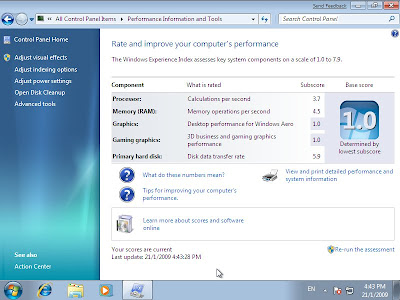
While I would normally not touch anything MS without a 10 yard pole, I’ve been hearing a lot of good things about Windows 7. Then today, a friend of mine who works for Microsoft (and shall remain nameless) asked me if I’d like to give Windows 7 a try. Being naturally curious about things like this, I thought that I’d give it a go to see what the fuss is all about.

Since I did not have any machine that met the minimum requirements for Windows 7 except for my main machine, I decided to install it inside a virtual machine instead. I ran a VM with 1Gb of RAM and 16Gb of hard disk space as the minimum requirements suggested. The installation took a very long time to finish but in the end, it only consumed about 6Gb of disk space.

My host machine is a dual-core AMD64 processor with 2Gb of memory. To make things run fast, I enabled hardware based virtualisation, which uses the VT extensions of the AMD processor to run things faster. What this means in layman terms is that I made the VM run as fast as I could, without purposely trying to degrade its performance in any way. During the install process, I took many screen shots of the virtual screen.

While I have yet to actually play with it fully, I think that it is safe to say that there are already visible pros and cons with the new OS. The main pro is that it does seem to boot fairly quickly and the interface feels responsive. The main con is that the user unfriendly-ness of Vista is still evident. As for the new look and feel of the OS, that is a very subjective thing to measure.

One thing that I do not understand about Windows is its inherent affinity towards rebooting the computer. During the installation process, it rebooted the VM several times. When it installed updates, it rebooted the VM again. Seriously, MS should think of a way to do these things without the unnecessary reboot. As other OSes have shown, it is perfectly possibly to do things without rebooting all the time.

It is good for me to know that Windows 7 will run on a lowly 2D graphics processor, which is what the VM emulates. Actually, with the VM, I was able test that it will happily boot up with only 128Mb of memory, although it uses a lot of disk space as swap and trashes the performance greatly. With only 64Mb, the dreaded ‘blue screen of death’ makes an appearance. It is good to see that some things do not change.

Okay, enough griping. Here are the screen shots.

http://picasaweb.google.com/s/c/bin/slideshow.swf

Auguring Obama

inaug4I watched Obama’s inauguration ceremony LIVE last night, on CNN and BBC. There were a number of video sites that were streaming the show including the likes of Hulu and Joost. However, I chose these sites because they were smoother than the rest. CNN only began to break up halfway through his speech, forcing many people to switch over to the Beebs.

What surprised me most was that I could actually watch the whole ceremony live on my meager Slowmyx connection. Anyone who knows our local broadband provider knows that their connection rates are highly unpredictable and typically much slower than advertised. Considering that I subscribe to a 512k connection and the videos were streaming in at 512k, I was quite impressed.

As for the actual ceremony itself, it was quite interesting as I had never seen a presidential inauguration before. It was funny when Obama had some problems with his oath taking bit and that it caught the justice by surprise as well. I guess that someone must have been extra nervous. I also liked the speech that he gave, trying to bring people together for the coming battle.

This got me thinking about my HTPC again. If 512k is enough to stream a live news feed, I might actually double that to a 1M line when I have my HTPC up, just so that I can watch online TV and not bother about installing Astro at home. I personally feel that Astro is a money sucking pit with terrible service. It has not seen an upgrade in service level quality since its early days. Just like almost everything else in Malaysia, Astro is a frakkin’ monopoly.

Therefore, it has had no incentive to upgrade it’s services. For one, it has definitely got the technological capability to bring in some wide-screen HD channels. There is even a growing market for such a service with new televisions being sold as wide-screen HD capable systems. There is even a menu entry for 16:9 in its settings, which incidentally does nothing. Seriously, besides carrying more “on-demand” SD channels, there seems to have been little change to its service.

Enough of my rant. I don’t have Astro at home anyway. So, setting up an IP-TV (so to speak) at home should be part of the HTPC functionality. Now, the only problem would be actually finding channels that would stream content to Malaysia. However, that is a problem that I can easily remedy. So there, I now have another reason to set up a HTPC in my living room.

LCD-TV Madness

Well, I found an unsolicited print advert in my post box today (otherwise known as spam), and it was from a local electrical appliance chain store. Right on the front page was a promotion for a “Super Branded LCD TV” for only RM1499 (£290)! Although it does not reveal the brand, it says there that it has “smart networking with VIERA link”, which was a dead giveaway.


Looking at the local Panasonic website, this “Super Branded LCD TV” is the Panasonic VIERA TX-32LE8MK, the lowest end LCD-TV that they carry in Malaysia. It is likely that this particular model is being EOL-ed and Panasonic is trying to get rid of them. Still, RM1499 is a very decent price for a brand name product. It has all the necessary bells and whistles one would expect from a 32″ LCD-TV.


As for the wireless keyboard that I had mentioned the other day, the LuxMate 810 Media Cruiser, it seems that this particular model has already been tested and certified to work out of the box (without any driver installation) on a Ubuntu system. So, it should work perfectly well with MythBuntu as a full fledged keyboard and mouse combo for only RM99.


As for the actual HTPC system, instead of buying the Compaq mini-Q NetTop, I might just assemble one myself. I’ve found a local retailer for a mini-itx chasis which looks okay, as a HTPC chasis for only RM200. Bundle that with a D945GCLF2 (RM290), 1Gb RAM (RM50) and 4Gb Flash (RM30), we’ve got a working HTPC system. I could add a USB Wifi for about RM50.

The final price tag would only be about RM2200! Not too shabby, really.

Zaurus Rawr!

This is another example of my engineer-ness. I was thinking about adding a computer to my car, what is known as a CarPC. Such a computer is typically used to provide music and videos for entertainment (it could also possibly be used to build a mobile WiFi hotspot if configured correctly).

Anyway, I was thinking about doing it. A CarPC could be installed in the boot of the car with little problem. I was thinking that an Atom based mini-itx board could be used, coupled with a small amount of memory and a solid state harddisk. Because the car will experience bumps and shocks, it is important to use a solid state drive. So, I was calculating the cost of doing this – about RM300 or so.

Then, the only trouble was with building a user interface to the computer. It has to be something that can be accessed from within the car. So, I thought of building my own little device with a screen and some buttons. Then, I suddenly realised that I could just use a PDA to control the CarPC. That was when the though hit me.

I could just use a PDA as the CarPC!

I have two old PDAs lying around, a Sharp Zaurus SL-5500 and an Acer Palm S10. The choice was evident on which to use. The Zaurus is infinitely hackable and had more computing power than the Palm. It has a 200MHz ARM processor, 64Mb RAM, 320×240 LCD display, keyboard, SD card slot, CF card slot. I plan to use the SD card slot for adding storage while using the CF card for peripherals (I have a wifi card for this device).

So, I dug up my old trusty Zaurus from my box of old stuff and plugged in the power cable. Nothing happened. Then, I shook the power socket a bit and the power-LED came on. That is a good sign. Then, I tried to turn it on and again nothing happened. I kept tapping away at the different buttons until something came on screen. However, the screen was dark because the back light did not want to come on. But after more fidgeting, the entire unit came to life! The batteries were just weak.

So, I logged onto the Internet and downloaded the latest version of OpenZaurus, a Linux operating system designed for the Zaurus. I flashed the internal firmware to the latest version and everything worked. This made me infinitely happy as I now have a semi-powerful computing device that I can install in my car. It runs on a 5V power supply which is easy to tap into, in a car.

So, the plan is to install a media player onto the Zaurus and test it to see if it can play MP3s and OGGs. If that works, the next thing to do would be to find a nice way to interface the Zaurus’ headphone socket to the car radio and provide a suitable 5V power supply. If that works, then it’s done!

In addition to playing media, I can install the wifi card onto the Zaurus and use it as a mobile way to say, check emails and such at public hotspots like at McDonalds or some other cafe. Now, that would be a real accomplishment. Wardriving is also a potential plus!
as

Case against LCD TV

I had the chance to visit The Mines shopping fair yesterday. It has been years since I have been there and the place has grown a lot in recent times. In addition to a new wing, where the top floor was once a mini theme park with rides and games for kids, it is now an entire floor dedicated to technology products and houses Malaysia’s largest IT retail store (with a lowest price guarantee!).

I had the chance to visually examine the picture quality of an LCD TV versus a plasma TV. It was clearly evident that the Plasma TV had a superiour image quality, with vivid colours. In contrast, LCD image quality seems to be perpetually screened with a layer of grey. This does not just apply to the blacks but also to the other colours. Blue oceans look blue on a plasma while they look a little dull on an LCD screen.

There is currently a promotion for a 32″ plasma from Haier, which is going for RM1588 (£300). This is a rather tempting buy as the RM1299 LCD does not come with any warranty while this Haier comes with a 3 year warranty. The main drawback is that the screen resolution for plasma TVs (852×480) are typically lower than LCDs (1366×768), which was visible on closer inspection.

Nonetheless, this 852×480 resolution is perfectly sufficient for watching DVD quality videos, which are typically 720×480 (NTSC). In this case, the video would have to be down-sampled instead of up-sampled for an LCD TV.

I also had the opportunity of viewing DLP projectors used for home entertainment. While these projectors can project images at any size, the contrast ratio is the worst of the lot. Everything looks like the colours had been drained out of them. They are also a little more expensive than the 32″ screens. So, it would be unwise to actually use a projector for a home theatre system (unless you planned to build a 20 seater mini-theatre at home).

Toshiba is doing a promotion and selling its AV500E 32″ LCD for RM1599 only. If I only plan to use the screen for watching videos, then 854×480 is a sufficiently high resolution. However, if I plan to use it as a living room PC as well, then the 1366×768 resolution would be better appreciated. I have a feeling that I may actually end up getting the Tosh instead.

While I was out shopping, I found the perfect keyboard for a HTPC – Genius Luxmate 810. It was designed for use with Windows Media Center Edition (Windows HTPC). It has a keyboard, remote and mouse pointer built into a wireless keyboard. It was retailing for RM99 at the computer store. This is one wicked keyboard for any HTPC.