Posts Tagged ‘ windows

NVDIA Tegra

11031-dsc00147There has been a lot of buzz over the demo of new Tegra platforms recently. Most of the news seems to pit the Tegra against Intel for dominance of the Netbook market. Personally, I have to agree in the most part. Except for the purpose of running Windows applications, a Tegra Netbook would be a better choice than an Atom based system for one simple reason: performance per watt.

For those of you who do not understand the difference, suffice to say that the Tegra is built of a different architecture from the Atom systems. As a result, the Tegra provides a richer multi-media experience than the Atom system and consumes less power while doing it. The reason is very simple. The Tegra integrates graphics capabilities from NVIDIA and a low-power multi-media enhanced ARM based system.

For those of you who have never heard of ARM, they are the microprocessors that power your mobile phones, ipods and various other consumer electronic and multimedia devices.

The super exciting thing about this is that NVidia is able to fit an entire computer platform onto a board that is only slightly larger than your typical USB flash drive. Therefore, it is obvious which market segment is NVidia targeting – the ultra-mobile and integrated devices.

You may ask what kind of software it can run. The answer is that it can run almost everything except Windows software. You see, there has been an ARM port of Linux for ages. In fact, Ubuntu has been working on exactly that – an ARM port of Ubuntu for the purpose of placing it on ARM based Netbooks. Google has also moved the Android platform up from merely powering smart-phones to powering ARM based Netbooks. In fact, Adobe has recently announced that they will be releasing flash support for ARM as well.

So, you can see where this is headed.

Oh, I forgot to mention its performance numbers. The various sites claim that it can playback 1080p video and can run for several days on a single battery charge. Personally, knowing how these things work, the numbers sound right.

Office Incompatibility

I had to fill in a few forms today. The good thing was, while the forms came in a Microsoft Word format, I had Microsoft Office to open them up with. Unfortunately, when I opened up the forms, they looked very different from what they were supposed to look as the formatting was all out of place. The problem turned out to be because the font used was missing from my system.

First thing I did was to look around for the font. Turns out that the “Sabon” font is a proprietary font. I would need to pay about US$30 for the privilege of downloading the font. That was just plain crazy. So, I tried replacing the font with an equivalent Serif font but it still wouldn’t format correctly. I even tried shrinking the size so that the form wouldn’t spill over onto the next page but to no avail.

Finally, I had to download the PDF version of the forms, print them out, fill them up by hand, and scan the forms back into the computer before emailing them in. How silly is that? Unfortunately, they don’t have PDF form versions. Otherwise, I would have used that from the start.

What this episode taught me was that there were little ways in which Microsoft Office documents would bite us. Even on Windows, there would be formatting issues. This has always been the only warning that I gave my friends about OpenOffice – formatting issues. Turns out that the formatting issues were probably due to the use of proprietary fonts too.

People should just stick with open-source fonts. There are quite a number of them around and they look good! [like the one pictured]

Going back to Linux

After spending the last month working on a Windows machine, I have decided to go back to using Linux in the office. If I have to use it under virtualisation, so be it. I have come to understand why trying to do development work on a Windows machine is a joke. Seriously, you won’t understand it until you have actually used Linux for real-world embedded development.

Let us just talk about this from an embedded developer perspective.

One word – Emacs. There are few integrated development environments that are as featured as Emacs. It has everything under the hood and more in its back pocket. Just like a woman, it takes a while to learn all the right moves but once that’s mastered, life will be good. Try comparing Eclipse or the piece-of-shit CodeWarrior that I have to use at work is laughable. While notepad++ shows some promise, it is but an infant compared to Emacs.

Two words – Code management. Windows does not come with any sort of code management system. Therefore, developers have developed a lot of bad habits over the years when it comes to working with code revisions such as the multiple-folder technique. Instead, Linux comes with a host of code management tools from the venerable RCS to the most modern Git. Once you have experienced the beauty that is distributed code management, it is difficult to go back to anything inferior.

Three words – Support Tools and Utilities. When you experience some trouble with some piece of code, you need to have a lot of support to solve it. Windows does not come with anything. For example, when you have some really cryptic C code that you need to understand, there’s always cdecl on Linux and nothing equivalent on Windows. Doxygen is truly a life-saver when it comes to the tedious work of generating mundane documentation, which every engineer hates to do.

Obviously, this just applies to a specific area. I’ve heard a lot of good things about Microsoft’s own developer tools. Unfortunately, those are not universal and are not suitable for use in embedded development. Maybe this is an area that Microsoft should take care of. However, they seem to have little incentive to do so as few embedded systems are bloated enough to run Windows.

Oracle-Sun

The tech industry has been buzzing with this corporate takeover merger for the last few days. In case the rest of you have not yet heard, or do not yet care, the Sun has been bought up by the Oracle. Sun used to give us the ‘dot’ in dot-com but they have always been a company with great products, but bad management. The new entity will give us another giant in the computing industry.

Let us start with Sun. Sun has an amazing array of technical products. Their UltraSPARC processors are the fastest and lowest power machines operating in the server space. Imagine having a processor that can execute 64 parallel threads in hardware. Now, we are talking some serious computing power. No serious business can do without having Sun machines as their backbone. This is particularly true in the telecommunications industry.

Then, right on top of all that hardware, Sun has Solaris – a mature Unix operating system. Hence, Oracle would be able to optimise and deploy their software on top of their own OS, without depending on either Linux or Windows. Who is to say that Oracle would not actually build new instructions and hardware capabilities into the next-gen UltraSPARC processors to give them an edge over the rest in hardware database acceleration. (hint: If anyone from Oracle is reading this, my PhD thesis is on hardware search acceleration!!)

Next, on top of this operating system layer, Oracle can now host their ever powerful database application. Their databases are universally recognised as the de-facto standard in corporate relational database management systems. There are many other products that compete with them, including from IBM, Microsoft and even some open source offerings. However, Oracle has always stayed ahead of the rest, due to effective marketing and management.

That is where the difference in their culture lies. Oracle has never actually had any technically superior products. However, they had good management. So, if they carefully crafted a path to integrate the best of Sun products with their management practices, they would create a new behemoth that can rival IBM, Microsoft and every other major name in IT.

All hail our new Oracle-Sun overlords!

Work Laptop

Today, I finally received the laptop that I am supposed to use at work. It is an older laptop but its specs are still fairly decent. It comes with a T2500 Core Duo processor at 1.8GHz with 2Gb of RAM. However, it has a puny little screen and I hope that I’ll be able to find a larger screen to hook it up to.

Unfortunately, it came with Windows XP. I was told that it would be configured in a dual-boot set up. However, it turns out that I will need to install Linux myself. Tomorrow, I intend to burn a Kubuntu 8.10 iso and install it onto the laptop. Then, for compatibility purposes, I will run the windows OS under a virtual machine. I will probably need to do this until I can be sure that there are no specific proprietary things that require Windows. Even then, I will probably still keep the partition around.

I will probably need to go in early to office in order to do this. I hope that Kubuntu can be installed with minimal hassle in the shortest amount of time. Then, I can hopefully get the trainer to help me set up the Linux version of their tools. This will probably help me simplify a lot of the development work that I will have to be doing in the future.

There are many people who use Linux at the office. So, it should not be an issue in my case. However, there aren’t many who use a dual-boot setup. Some run Linux under a virtual machine and others use a remote login programme to run Linux on the servers. However, seeing that I have a working Windows version, I should be able to copy any settings over easily.

So, here’s to myself – and Linux. All the best!

Computer Archeology

AMDRecently, I have ‘dug’ up a lot of old computers. Then, this evening, I was describing my home network to another geek friend of mine and he asked me, how many computers do I have in my house at this very moment. While trying to list down the machines that I have, I came to realise that I have a lot of them. So, I thought that I’d list them down just for fun, in functional order:

Server

  • One Dell server that I bought a long time ago to run some Windows server software. I keep it around because it is the only Windows machine that I have. It is a dual-processor P3 class machine with SCSI disks. I once lent it to a friend for some 3DS rendering work.
  • Two VIA based machines that were also bought ages ago. Both have C3 1GHz processors but are now dead. They’ve got working 125W ATX power supplies though.

Desktop

  • One Celeron 1.8GHz machine that my dad uses as his main desktop computer. It currently runs Debian Lenny with XFCE and OpenOffice.
  • Seven VIA based machines ranging from Eden 533MHz to C3 1.0GHz machines. These are physically small machines that are re-purposed for different functions. I used one as my HTPC prototype and am currently using another one as a development server. I like them because they draw very little power.

Laptop

  • One old Gateway laptop around the class of a P3 600MHz. Retired due to age. I might just turn it back on again at some point.
  • One Fujitsu laptop around the class of a AthlonXP 1.5GHz. Has thermal problems but works fine when under-clocked to 500MHz. I am using it as a electronic testing platform.
  • One HP laptop that I am presently using as my main work machine. It is a Athlon X2 2.0GHz class machine.

Non-Functional

  • One 386 class machine that was my first computer. My dad bought it for my sister. It now lives as a board in a box.
  • One 486 class machine that I bought off auction. It now lives also as a board in a box.
  • One Cyrix 586 class machine that was my second desktop when I was a kid. It was the first computer that I bought myself.
  • Two Pentium class machines that are no longer working either.
  • One Duron 1.3GHz machine that served as my trusty desktop at university. It was still working when I left for my PhD but it refuses to start now. I wonder what happened to my Athlon 500MHz machine?

Microprocessors

  • One Motorola 68K processor that was part of an abandoned SBC project.
  • Dozens of PIC processors that have found life and death in various random hobby projects.

Man, that is a lot of computers. Taking away the broken ones and the microprocessor parts, that’s still 12 working machines in total. The thing is, I plan to buy a couple more in the near future – my NAS and HTPC projects, remember? LOL! :D

To network them all up, I have a 11b access point and 11g router running at home. I also have eight 11b USB dongles that I use to connect the machines to the home network. In addition, I have many metres of Cat5e cables and half a dozen ethernet cards at home too. The only thing that I’m short of at home is power points.

Maybe I can one day build my own mini-computer museum at home. Maybe I should do it today! I managed to clear out one display-case during my spring cleaning. I could possibly fashion some labels and display boxes out of the other junk that I’ve uncovered. At the very least, I should preserve the microprocessors since that is my field of interest.

BSD Windows

FreeBSD mascotI had this short conversation with several people the other day, where I mentioned about Windows. I wondered why Microsoft has not decided to build the next version of Windows on the BSD kernel. Besides the sin of pride, I really couldn’t think of any technical reason not to.

BSD is a distribution of Unix created by UC Berkeley. Unix is an operating system developed in 1969. Through the years, it has evolved into an extremely secure and stable OS. People who use real computers (not toy computers) use variants of Unix. There is no technical reason why Microsoft cannot just use BSD and rid the whole world of numerous security problems. A company that has finally decided to do exactly that, after going their own way, is Apple. Just in case you didn’t know, Apple uses a BSD operating system. They then designed a ultra cool user interface on top of it. Microsoft could always copy Apple – they do it all the time anyway.

  1. Backwards Compatibility
    Some people may think that Microsoft needs to maintain backwards compatibility. Therefore, it cannot make a major architectural change like that. I laugh inside whenever I hear this. However, most people are not familiar with the Church-Turing thesis and therefore, I must forgive them. Microsoft is not the scion of backwards compatibility. They often break compatibility within their own products.

    Apple has shown us that backwards compatibility is certainly possible. Few people realise that you can run Apple II software on a modern Mac. This is ultimate backwards compatibility. The Apple used to use a Motorola 68K microprocessor, then moved onto the IBM PowerPC before finally turning to Intel x86 today. Apple has shown that not only is backwards compatibility possible, even software written for an entirely different computer architecture can be kept compatible.

  2. Proprietary Software
    Some people may think that Microsoft has a lot of secret sauce that it needs to keep hidden and using an open source OS like any of the modern BSDs will force it to reveal its hand. This is a myth because the BSDs are distributed under a very permissive BSD license, which basically allows you to do whatever you want with it, including building proprietary software out of it.

    In fact, Apple again has shown how to do it. Apple has plenty of secret sauces that Microsoft is still failing to copy successfully. Apple has built them all on top of BSD and does not need to share it with the world if it does not want to. It all comes down to the terms of the BSD license. It is more commercial friendly than say, the GPL that is used by Linux. That’s why I’m suggesting BSD instead of Linux Windows

  3. Technical Superiority
    This is another laughable excuse. While many people are heralding the technical superiority of Windows 7, please remember that they are comparing it against Vista, not any of the Unices. While they herald the resource savings of Windows 7, please remember that a full fledge BSD install with graphical user interface can fit inside 128Mb of hard disk space or less, using even less memory. While users try to fight off the ‘infection of the day’ on Windows, the Unix people are free to do something useful with their time instead.

So, I sometimes wonder why Microsoft still wants to go it alone and re-design their OS from the ground up so many times and still fail to get it right. Their track record has shown that they just cannot write quality software. Since there is already a proven 40 year-old OS out there for the taking, it is really stupid not to just customise it and use it.

The other day, a friend of mine tried out Linux for the first time and asked me what anti-virus he needed to install. He did not quite believe me when I told him that there was no such thing. Those that are written for Linux, such as ClamAV and F-Prot, are actually designed to kill Windows viruses, not Linux ones. Seriously. You do not know what it is like to live in a virus free world until you have entered the world of Unix. It is totally refreshing and fun.

Microsoft should seriously consider doing an Apple. It will end up doing the whole world a favour by introducing ‘safe computing’ to the masses instead of introducing new infections with every new version of Windows.

FAT32 FUD

Most technology sites today are reporting on the news that Microsoft is starting its patent attack on Linux. According to the news, it pertains to Microsoft suing a GPS device manufacturer (TomTom) for alleged infringement on Microsoft patents on the FAT32 filesystem. Sigh. This is again FUD.

While I do agree that there are utilities in Linux that use FAT32, it is most definitely non essential. There are like a dozen file-systems that Linux can use. 99% of Linux distributions will either use Ext-FS or ReiserFS as the default file-system. In fact, the only reason that FAT32 code is available in Linux is because of compatibility with other (read – Windows) systems, which is the same reason why NTFS has not taken over Windows entirely (backwards compatibility).

However, there is a far deeper problem here. 99% of consumer electronic devices use the FAT32 file-system (think thumb-drives, digital cameras, mp3 players). While most major companies would have licensed the patent from Microsoft, I can tell you with 100% certainty that there are a lot of companies who do not license it, particularly small and medium electronic companies.

I know for certain because this question gets asked a lot on various embedded electronic forums. Designers of embedded devices are always trying to embed things like SD-cards in their devices because it is very cheap storage (2Gb@RM20). The typical answer that designers get is that Microsoft owns the patent but they are unlikely to enforce it. This case may just change that.

So, while Microsoft may want to spin this as a battle against Linux, in reality it isn’t. Life goes on in Linux without FAT32. The ones who may really end up being hurt are consumer electronic companies like TomTom and ultimately the consumer.

The simple solution to this problem is for the whole consumer electronics industry to standardise on a new file-system that everyone will recognise in their products. However, this is a pipe dream as they aren’t even able to standardise on a single media (SD, CF, XD, MS). But this case may just force people to do that. Otherwise, Microsoft will always hold a knife at our throats.

PS: As for TomTom, since they control their product ecosystem entirely, they can just remove the offending FAT32 code and use JFS/Ext2 instead.

Windows 7 BSoD

Hell must have frozen over! Pigs must be flying in the sky! The dead must be walking in the streets! Chaos! Mayhem! Anarchy! Windows 7!

While I would normally not touch anything MS without a 10 yard pole, I’ve been hearing a lot of good things about Windows 7. Then today, a friend of mine who works for Microsoft (and shall remain nameless) asked me if I’d like to give Windows 7 a try. Being naturally curious about things like this, I thought that I’d give it a go to see what the fuss is all about.

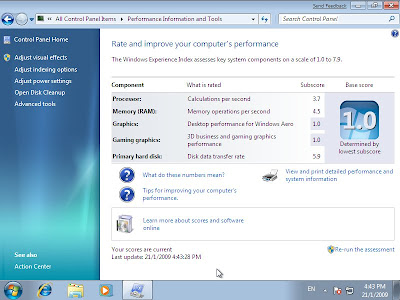
Since I did not have any machine that met the minimum requirements for Windows 7 except for my main machine, I decided to install it inside a virtual machine instead. I ran a VM with 1Gb of RAM and 16Gb of hard disk space as the minimum requirements suggested. The installation took a very long time to finish but in the end, it only consumed about 6Gb of disk space.

My host machine is a dual-core AMD64 processor with 2Gb of memory. To make things run fast, I enabled hardware based virtualisation, which uses the VT extensions of the AMD processor to run things faster. What this means in layman terms is that I made the VM run as fast as I could, without purposely trying to degrade its performance in any way. During the install process, I took many screen shots of the virtual screen.

While I have yet to actually play with it fully, I think that it is safe to say that there are already visible pros and cons with the new OS. The main pro is that it does seem to boot fairly quickly and the interface feels responsive. The main con is that the user unfriendly-ness of Vista is still evident. As for the new look and feel of the OS, that is a very subjective thing to measure.

One thing that I do not understand about Windows is its inherent affinity towards rebooting the computer. During the installation process, it rebooted the VM several times. When it installed updates, it rebooted the VM again. Seriously, MS should think of a way to do these things without the unnecessary reboot. As other OSes have shown, it is perfectly possibly to do things without rebooting all the time.

It is good for me to know that Windows 7 will run on a lowly 2D graphics processor, which is what the VM emulates. Actually, with the VM, I was able test that it will happily boot up with only 128Mb of memory, although it uses a lot of disk space as swap and trashes the performance greatly. With only 64Mb, the dreaded ‘blue screen of death’ makes an appearance. It is good to see that some things do not change.

Okay, enough griping. Here are the screen shots.

Case against LCD TV

I had the chance to visit The Mines shopping fair yesterday. It has been years since I have been there and the place has grown a lot in recent times. In addition to a new wing, where the top floor was once a mini theme park with rides and games for kids, it is now an entire floor dedicated to technology products and houses Malaysia’s largest IT retail store (with a lowest price guarantee!).

I had the chance to visually examine the picture quality of an LCD TV versus a plasma TV. It was clearly evident that the Plasma TV had a superiour image quality, with vivid colours. In contrast, LCD image quality seems to be perpetually screened with a layer of grey. This does not just apply to the blacks but also to the other colours. Blue oceans look blue on a plasma while they look a little dull on an LCD screen.

There is currently a promotion for a 32″ plasma from Haier, which is going for RM1588 (£300). This is a rather tempting buy as the RM1299 LCD does not come with any warranty while this Haier comes with a 3 year warranty. The main drawback is that the screen resolution for plasma TVs (852×480) are typically lower than LCDs (1366×768), which was visible on closer inspection.

Nonetheless, this 852×480 resolution is perfectly sufficient for watching DVD quality videos, which are typically 720×480 (NTSC). In this case, the video would have to be down-sampled instead of up-sampled for an LCD TV.

I also had the opportunity of viewing DLP projectors used for home entertainment. While these projectors can project images at any size, the contrast ratio is the worst of the lot. Everything looks like the colours had been drained out of them. They are also a little more expensive than the 32″ screens. So, it would be unwise to actually use a projector for a home theatre system (unless you planned to build a 20 seater mini-theatre at home).

Toshiba is doing a promotion and selling its AV500E 32″ LCD for RM1599 only. If I only plan to use the screen for watching videos, then 854×480 is a sufficiently high resolution. However, if I plan to use it as a living room PC as well, then the 1366×768 resolution would be better appreciated. I have a feeling that I may actually end up getting the Tosh instead.

While I was out shopping, I found the perfect keyboard for a HTPC – Genius Luxmate 810. It was designed for use with Windows Media Center Edition (Windows HTPC). It has a keyboard, remote and mouse pointer built into a wireless keyboard. It was retailing for RM99 at the computer store. This is one wicked keyboard for any HTPC.